Signature Verification
Lankir can verify digital signatures in PDF documents to confirm their authenticity and integrity.
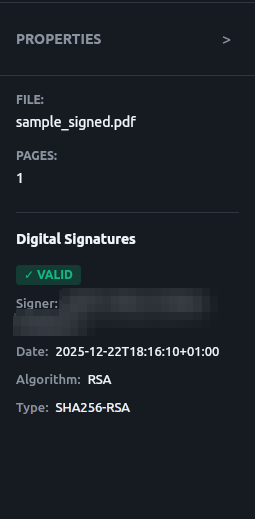
Verification panel showing signature status and certificate details
Verification Overview
When verifying a signature, Lankir checks:
Cryptographic validity - The signature mathematically matches the document
Document integrity - The document hasn’t been modified since signing
Certificate validity - The signing certificate is/was valid
Certificate trust - The certificate chain leads to a trusted root
Verifying Signatures
Via GUI
Open a signed PDF
The signature panel shows all signatures with their status
Click a signature for detailed information
Via CLI
lankir sign verify document.pdf

# JSON output for scripting
lankir sign verify document.pdf --json
Verification Output
lankir sign verify contract_signed.pdf

# Output:
Signature Verification Results:

Signature 1:
  Signer:           John Doe
  Signing Time:     2025-01-15 14:30:00 UTC
  Status:           ✓ Valid
  Document:         Not modified since signing
  Certificate:      Valid and trusted

Overall: Document has valid signatures
Verification Status
Signature Status
Status |
Icon |
Meaning |
|---|---|---|
Valid |
✓ |
Signature cryptographically valid |
Invalid |
✗ |
Signature doesn’t match document |
Unknown |
? |
Cannot verify (missing data) |
Certificate Status
Status |
Meaning |
|---|---|
Valid and trusted |
Certificate valid, chain verified |
Valid but untrusted |
Certificate valid, issuer not in trust store |
Expired |
Certificate was valid at signing time |
Revoked |
Certificate has been revoked |
Invalid |
Certificate has issues |
Understanding Results
Valid Signature
{
  "signerName": "John Doe",
  "signingTime": "2025-01-15T14:30:00Z",
  "isValid": true,
  "certificateValid": true,
  "validationMessage": "Signature is cryptographically valid",
  "certificateValidationMessage": "Certificate is valid and trusted"
}
The signature is:
Cryptographically correct
Signed by a valid certificate
Document unchanged since signing
Valid but Untrusted
{
  "isValid": true,
  "certificateValid": false,
  "certificateValidationMessage": "Certificate chain validation issue (not in system trust store)"
}
The signature is mathematically valid, but:
The issuing CA isn’t in your trust store
You cannot verify the signer’s identity
This is common with:
Self-signed certificates
Corporate CAs not in public trust stores
Certificates from unfamiliar issuers
Invalid Signature
{
  "isValid": false,
  "validationMessage": "Signature validation failed: document modified"
}
The document has been modified after signing. The signature is no longer valid.
Signature Details
Signer Information
Field |
Description |
|---|---|
|
Name from certificate |
|
Full distinguished name |
|
Contact information (if provided) |
Timing
Field |
Description |
|---|---|
|
When the signature was created |
Note
The signing time comes from the signer’s system clock unless a timestamp authority was used.
Cryptographic Details
Field |
Description |
|---|---|
|
Algorithm (e.g., RSA, ECDSA) |
|
Hash algorithm (e.g., SHA-256) |
Signature Metadata
Field |
Description |
|---|---|
|
Why the document was signed |
|
Where it was signed |
Multiple Signatures
PDFs can have multiple signatures. Each is verified independently:
lankir sign verify multi_signed.pdf

# Output:
Signature Verification Results:

Signature 1:
  Signer:           Alice Smith (Preparer)
  Signing Time:     2025-01-10 09:00:00 UTC
  Status:           ✓ Valid

Signature 2:
  Signer:           Bob Jones (Approver)
  Signing Time:     2025-01-12 14:30:00 UTC
  Status:           ✓ Valid

Overall: All 2 signatures are valid
Verification in Scripts
Check if Document is Signed
# Returns exit code 0 if signed, 1 if not
lankir sign verify document.pdf > /dev/null 2>&1
if [ $? -eq 0 ]; then
    echo "Document is signed"
fi
Parse JSON Output
# Get signer name
lankir sign verify document.pdf --json | jq '.[0].signerName'

# Check if all signatures valid
lankir sign verify document.pdf --json | jq 'all(.isValid)'
Batch Verification
#!/bin/bash
for pdf in *.pdf; do
    result=$(lankir sign verify "$pdf" --json 2>/dev/null)
    if [ -n "$result" ]; then
        valid=$(echo "$result" | jq 'all(.isValid)')
        echo "$pdf: signatures valid = $valid"
    else
        echo "$pdf: no signatures"
    fi
done
Trust Store
Lankir uses the system’s trust store for certificate validation:
/etc/ssl/certs/ca-certificates.crt(Debian/Ubuntu)/etc/pki/tls/certs/ca-bundle.crt(Fedora/RHEL)
Self-Signed Certificates
Signatures from self-signed certificates show as “valid but untrusted.” To trust them:
Add the CA certificate to your system trust store:
sudo cp my-ca.crt /usr/local/share/ca-certificates/
sudo update-ca-certificates
Or accept untrusted signatures in your workflow (with caution)
Common Scenarios
“Signature valid, certificate expired”
The certificate has expired now, but may have been valid when signed:
Check if
signingTimeis before certificate expiryThe signature may still be legally valid depending on jurisdiction
“Document modified after signing”
Someone changed the PDF after it was signed:
The signature is invalid
Changes could be malicious or accidental
Request a new signed copy from the signer
“Certificate revoked”
The signer’s certificate has been revoked:
Check when revocation occurred vs. signing time
Revocation before signing = signature invalid
Revocation after signing = depends on timestamp
Limitations
Current verification limitations:
No OCSP/CRL checking (online revocation)
No timestamp authority (TSA) validation
No LTV (Long-Term Validation) support
These features are planned for future releases.
Next Steps
Certificate Management - Manage trusted certificates
Signing PDFs - Create signatures