Certificate Management
Lankir aggregates certificates from multiple sources for signing PDFs.
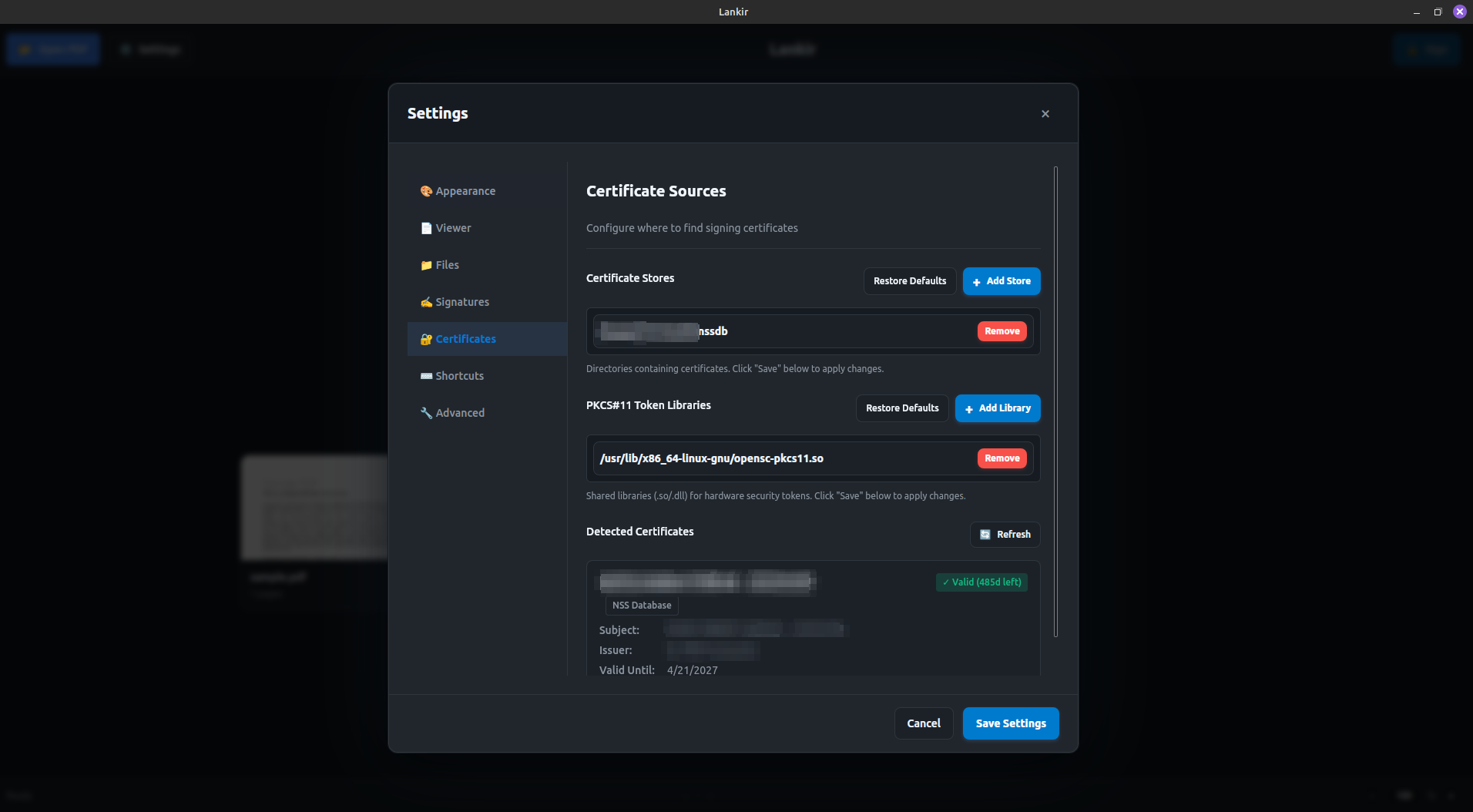
Certificate list showing certificates from multiple sources
Certificate Sources
PKCS#12 Files (.p12, .pfx)
Personal certificate files containing both the certificate and private key, protected by a password.
Default search locations:
/etc/ssl/certs(system)~/.pki/nssdb(user)
Adding custom directories:
# View current stores
lankir config get certificateStores

# Add a directory (must be absolute path in allowed locations)
# Edit ~/.config/lankir/config.json directly
PKCS#11 (Hardware Tokens)
Smart cards, USB tokens, and HSMs accessed via PKCS#11 modules.
Auto-detected modules:
/usr/lib/x86_64-linux-gnu/pkcs11/p11-kit-client.so(p11-kit proxy)/usr/lib/x86_64-linux-gnu/opensc-pkcs11.so(OpenSC)
Adding custom modules:
# View current modules
lankir config get tokenLibraries

# Modules must have .so extension and exist on the filesystem
NSS Database (Firefox/Chrome)
Lankir reads certificates from browser certificate stores:
~/.mozilla/firefox/*/cert9.db~/.pki/nssdb/cert9.db
These are automatically discovered—no configuration needed.
Listing Certificates
All Certificates
lankir cert list

# Output:
# Found 3 certificate(s):
#
# Certificate 1:
#   Name:          John Doe
#   Subject:       John Doe
#   Issuer:        Example CA
#   Valid From:    2024-01-01 00:00:00
#   Valid To:      2025-12-31 23:59:59
#   Fingerprint:   a1b2c3d4e5f6...
#   Source:        pkcs12
#   Valid:         true
#   Can Sign:      true
Filtered Lists
# Only valid (non-expired) certificates
lankir cert list --valid-only

# Filter by source
lankir cert list --source pkcs11
lankir cert list --source pkcs12
lankir cert list --source nss

# Search by name/subject/issuer
lankir cert search "john"

# JSON output
lankir cert list --json
Show All Details
By default, only the first 20 certificates are shown:
# Show all certificates
lankir cert list --all
Certificate Properties
Property |
Description |
|---|---|
|
Common name or filename |
|
Certificate subject DN |
|
Issuer’s common name |
|
Unique serial number |
|
Start of validity period |
|
End of validity period |
|
SHA-256 hash (unique identifier) |
|
Where certificate was found |
|
Allowed operations |
|
Currently within validity period |
|
Has digital signature capability |
|
PIN needed for signing |
|
File location (for PKCS#12) |
|
Module path (for PKCS#11) |
Certificate Requirements
For signing PDFs, certificates must have:
Digital Signature key usage - The certificate must allow signing
Valid dates - Current time within NotBefore and NotAfter
Private key access - Either embedded (PKCS#12) or accessible (PKCS#11)
Check signing capability:
lankir cert list --valid-only | grep "Can Sign"
PKCS#12 Certificate Files
Creating a Self-Signed Certificate
For testing purposes:
# Generate private key and certificate
openssl req -x509 -newkey rsa:2048 \
  -keyout key.pem -out cert.pem \
  -days 365 -nodes \
  -subj "/CN=Test User/O=Test Org"

# Package as PKCS#12
openssl pkcs12 -export \
  -in cert.pem -inkey key.pem \
  -out test.p12 -name "Test Certificate"
Importing Certificates
Place .p12 or .pfx files in a configured certificate store directory:
# Copy to user certificate directory
cp mycert.p12 ~/.pki/nssdb/
Or add your certificate directory to the configuration.
Hardware Token Setup
Smart Card Readers
Install PC/SC daemon:
sudo apt install pcscd pcsc-tools # Debian/Ubuntu
Start service:
sudo systemctl enable --now pcscd
Verify card detection:
pcsc_scan
Common PKCS#11 Modules
Token Type |
Module Path |
|---|---|
Generic (p11-kit) |
|
OpenSC (most cards) |
|
YubiKey |
|
SafeNet |
|
SoftHSM (testing) |
|
Testing PKCS#11 Access
# List slots with p11tool
p11tool --list-tokens

# List certificates on token
p11tool --list-all-certs "pkcs11:token=MyToken"
Browser Certificate Import
From Firefox
Firefox certificates are automatically detected. To manually export:
Firefox → Preferences → Privacy & Security → Certificates → View Certificates
Your Certificates tab → Select certificate → Backup
Save as
.p12file
From Chrome
Chrome uses the NSS database in ~/.pki/nssdb/:
# List certificates in Chrome's NSS database
certutil -d sql:$HOME/.pki/nssdb -L

# Export a certificate
pk12util -d sql:$HOME/.pki/nssdb -o output.p12 -n "Certificate Name"
Troubleshooting
Certificate Not Showing
Check source is configured:
lankir config get certificateStores
lankir config get tokenLibraries
Verify file permissions:
ls -la ~/.pki/nssdb/
For PKCS#11, check service:
sudo systemctl status pcscd
“Certificate cannot sign”
The certificate lacks digital signature key usage:
# Check key usage
openssl x509 -in cert.pem -text | grep -A1 "Key Usage"
Wrong Password
PKCS#12: The password protects the file
PKCS#11: The PIN protects the token
NSS: May require the master password
Certificate Expired
Check validity:
lankir cert list | grep -A2 "Valid"
Renew your certificate with your certificate authority.
Security Best Practices
Protect PKCS#12 files - Use strong passwords, restrict file permissions
Hardware tokens preferred - Private keys never leave the device
Regular rotation - Renew certificates before expiration
Audit certificate usage - Monitor which certificates are used
Next Steps
Signing PDFs - Use certificates for signing
Signature Profiles - Configure signature appearance